What does MedLoanIQ do?
Federal student loan repayment is genuinely complex, especially for borrowers whose income will rise steeply over the first few years of their careers. Recent changes to the federal repayment landscape — the introduction of RAP, the pending sunset of PAYE, and the fact that switching from IBR to RAP is irreversible — have made the choice harder, not easier. MedLoanIQ is an educational tool that runs the math across different scenarios so you can see how the plans compare for your situation. It is particularly useful for graduating professional students (dentists, veterinarians, lawyers, physicians, and others) with substantial federal loan balances, borrowers pursuing or considering PSLF, and married borrowers weighing joint vs. separate tax filing year by year.
IBR vs RAP Comparison
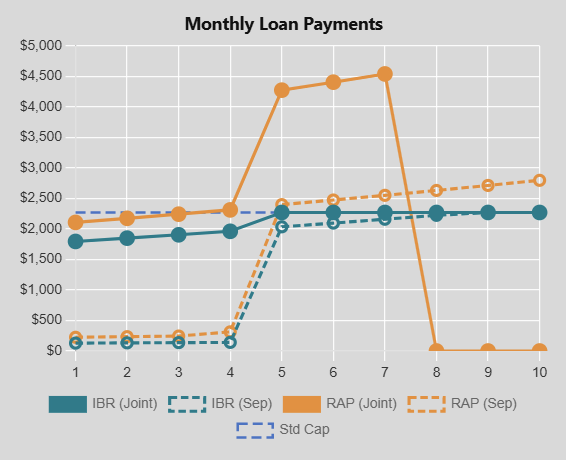
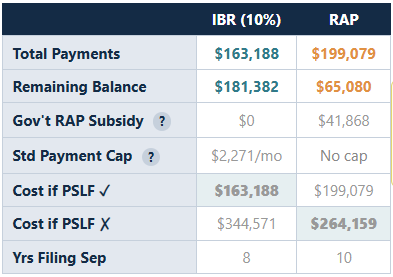
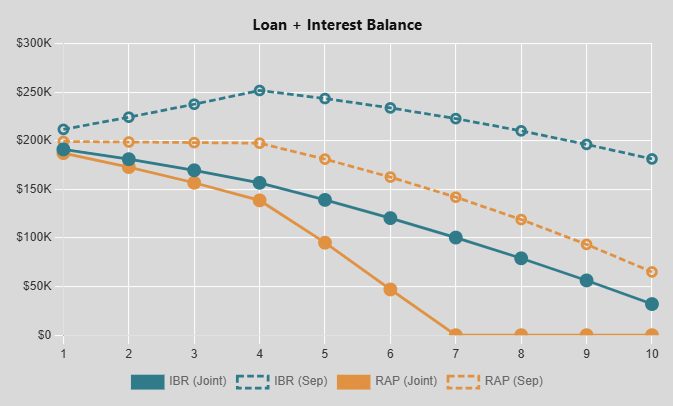
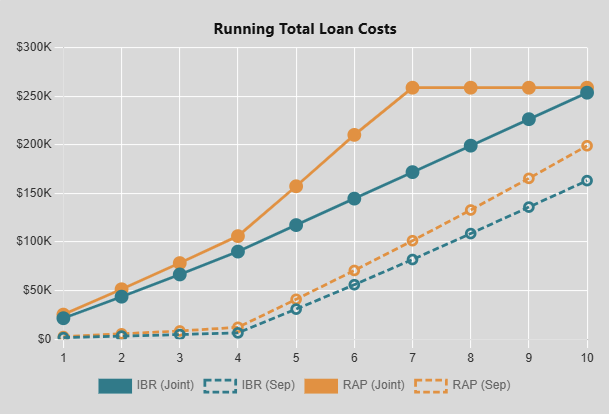
Side-by-side monthly payment, total cost, and loan balance projections for both plans across your full PSLF window.
PSLF Optimizer
Find your optimal switch year — when to move from RAP to IBR to minimize payments while maximizing forgiveness.
Filing Status Analysis
Model the impact of filing jointly vs. separately on your payments. Includes an embedded MFJ vs MFS tax comparison tool to calculate your actual tax cost.
Consolidation Modeling
See exactly how consolidating your loans would change your interest rate, payments, and total cost to forgiveness.
Visual Charts & Tables
Year-by-year payment schedules, balance curves, and cumulative cost graphs — all exportable for your own planning.
AI Assistant
Ask plain-English questions about your results. Claude explains the tradeoffs, flags unusual patterns, and helps you understand what matters.